0.9.2: songs move in scenes, one folder for your sounds, more handhelds
NewSONG rows play together · your WAVs in OZMA/Samples · packages for Knulli, muOS and Ports systems
FixedMIDI clock keeps the tempo · no stuck notes · SPEAKER with a USB sound card · MORPH HOLD on short sounds
Saferquitting after an update keeps it · never installs over a newer version · a wrong download is refused
All of 0.9.2
SONG rows play together
A row lasts as long as its longest clip. Shorter clips loop until the row ends.
Every track starts the next row at the same moment.
An empty cell is a rest for that track, so you no longer need empty clips to make a break.
A row with no clips is where the song loops. START stops the song.
Old songs with clips of different lengths on one row, or with empty cells, can sound different now, and so do the demos DEEP FIELD and ION DRIVE. LIVE works as before.
Your own sounds
Put WAV files in OZMA/Samples at the top of the SD card, on every system. OZMA makes the folder, with a short note inside.
The sample list shows your files together with OZMA's own sounds; its last line says where the folder is.
OZMA only reads this folder. Your old samples in data/Samples stay and keep working.
A song that uses a sound from the new folder opens in 0.9.1 without that sound.
Safer updates
Quitting right after an update (QUIT, or the system closing OZMA) keeps the new version; only crashes roll back. Turning the Brick off within 20 seconds of a start counts as a start: the new version stays unless that happens three starts in a row.
A rollback that cannot finish says so and tries again.
While a new version installs at start, the screen shows the UPDATE rocket and “UPDATING OZMA, DO NOT TURN OFF”. You will see it from the next update on: this one is installed by the updater already on your card.
An update never installs over the same or a newer version, and a wrong download is refused before anything changes.
Wi‑Fi UPDATE downloads and installs on the Brick with spruce or the stock TrimUI OS. On other systems it tells you a new version is out and you install the new package by hand; on MinUI it is off. Knulli and NextUI no longer install by Wi‑Fi.
More handhelds
Packages for Knulli, muOS, and ROCKNIX, AmberELEC, ArkOS, dArkOS and other systems with a Ports list. Not tested on a real device yet: please try them and tell us. Which build?
Handhelds without FN keys: hold R1 + R2 for PERFORM, R1 + MENU for QUICK MIX.
NextUI and MinUI: hold POWER about 1 second to save and quit.
On systems other than spruce and the stock OS, OZMA writes a report file next to the app after each run, for bug reports. It is never sent anywhere.
Sound and MIDI
MIDI clock keeps the tempo if the source stops without a Stop.
No stuck notes when a keyboard is unplugged.
CLOCK OUT off stops the gear that follows OZMA.
SPEAKER really uses the speaker while a USB sound card is plugged in.
MORPH HOLD on a very short sound no longer mutes the mix.
Also
BALANCE LEARN says what it changed (“LEARNT: LESS MUD, MORE AIR”). Hold Y to hear the mix without it; B+A drops it, L2 brings it back.
The lessons never overwrite your song called MYTRACK: they use MYTRACK2 and say so.
Clearer screens: the clip number and where else a clip is used, what A does on an empty cell, MIDI OUT fields that don't send yet are greyed out.
No short freeze while a sample loads from a slow SD card.
Your songs, samples and settings stay as they are.
Free. On the Brick with spruce or the stock TrimUI OS: PROJECT › UPDATE in OZMA. Everywhere else: the new package from itch.io (which one?).
Free, like every release. The crew keeps them coming: join the crew →
Hotfix · · free
0.9.1: steadier updates, USB audio to iPad
NewUSB audio to iPad · MIDI keyboard and USB audio at once · launch files for other handhelds
Fixedno false “clock not synced” on update · updates never hang · MIDI clock · starting on Knulli and NextUI
Safersigned updates · resume after Wi‑Fi drops · rollback if the new version won't start
All of 0.9.1
New
USB audio to iPad. The Brick sees whether it is plugged into a computer or an iPad and switches by itself. On an iPad, OZMA records into GarageBand and other apps over USB‑C.
A MIDI keyboard and USB audio at once. Keyboard in the top port, recording on a computer or iPad through the bottom one. Tested with an Arturia MiniLab 3.
Launch files for other handhelds. Not tested on a real device yet.
Fixed
No more false “clock not synced” error when you update: OZMA brings its own certificates and no longer depends on the system.
An update never hangs: on a slow network OZMA tells you so.
MIDI clock: one tempo source, no echo on THRU, and the computer gets Start and the song position.
Starting on other firmware (Knulli, NextUI): fewer “missing file” errors and a clearer message when something is wrong.
Safer updates
Updates are signed.
A download picks up where it stopped if Wi‑Fi drops.
If the new version does not start, OZMA rolls back by itself.
Free over Wi‑Fi: PROJECT › UPDATE in OZMA. Or download it on itch.io.
Flight log · OZMA updates ·
0.9“Supernova”Super big patch
Any sound becomes an instrument. Any groove becomes a loop.
Hum a note and play it on the keys. Press X and what you just heard becomes a loop. Send your tracks through a map of new effects and watch the mix pump. The biggest OZMA update yet, on the TrimUI Brick.
Drop a WAV loop on LIVE and it plays in your song's tempo. WARP AUTO listens first, and a new SAMPLER screen shows the whole sound at a glance.
Why you'll like it
Sample packs just work: no tempo maths, drums keep their punch, and the song tempo never moves.
Try it
LIVE › X on an empty cell › LOAD LOOP
A drum loop. WARP AUTO hears the hits, cuts the loop at each one and puts them on the song's grid. Every hit keeps its attack.
A pad, a bass, a held chord. Nothing to cut, so WARP AUTO stretches it, now cleaner on bass, pads and held notes.
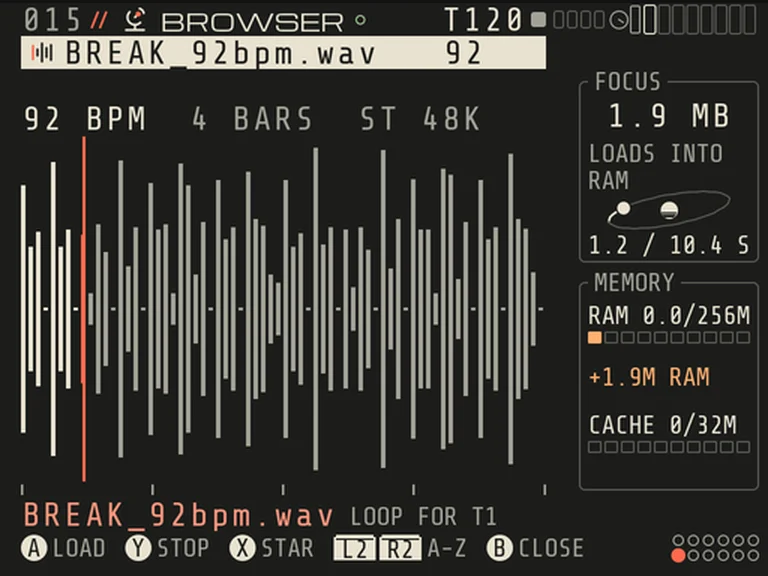
RADAR reads the loop: BREAK_92bpm.wav, 92 BPM, 4 bars, ready for T1.
The tempo from the name. A tempo in the file or folder name is used, like Deep House 124 BPM/. A kick named 063_Kick stays a one-shot.
Honest when it guesses. If OZMA only guessed the tempo, it says NOT SURE and puts the cursor where you fix it.
Half or double in one move.×2 and ÷2 on BPM and BARS.
One L2 undoes it all. And the next loop of the pack is one move away: A on FILE opens RADAR right on it.
01b · SAMPLER v4
A new SAMPLER screen
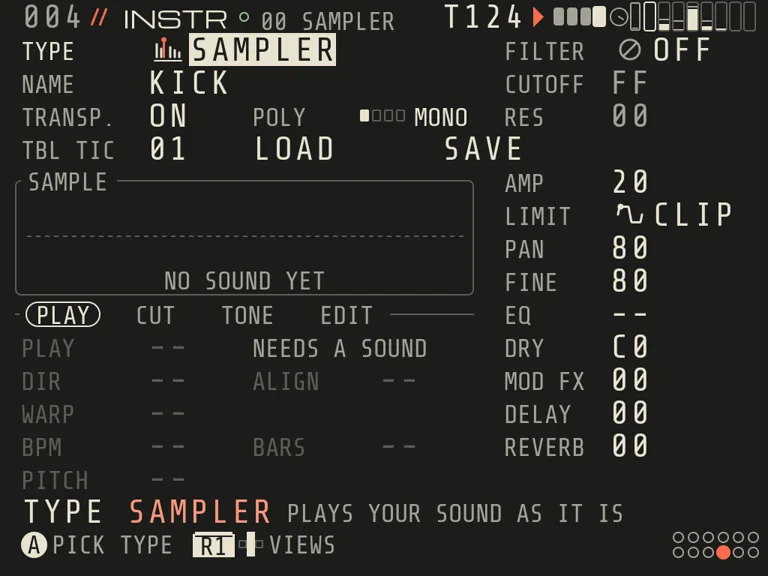
See the sound. A wave box with START, LOOP and END marks and a ruler.
No scrolling. Four tabs, PLAY, CUT, TONE and EDIT, five rows each.
Nothing hidden. Rows that don't apply are dim and say why.
Small helpers. LOOP XFADE for smooth loop points, longer loops of 16 to 32 bars, and a PITCH hint that names the note it hears.
The new SAMPLER screen in OZMA 0.9. SAMPLER and MORPH now speak one language.
02 · New on LIVE
MAKE LOOP
That was good. Keep it.
What it is
A looper on LIVE. One press turns everything you just heard into one loop, your hand-played notes too.
Why you'll like it
Keep the good take without stopping the music. Nothing to render, and the old row stays as it was.
Try it
LIVE › X on a playing clip
The real LIVE screen in OZMA 0.9: X, then LOOP READY · ROW 04, and the loop takes over on the bar.
Instant. OZMA keeps the last 64 seconds it played, so most loops come from what you already heard. Nothing to render.
Your hands are in it. JAM notes, PERFORM moves, knob turns, even sound coming in from your computer over USB.
Always a way back. B right after, L2, or B+A on the loop cell at any time: the tracks come back on the bar. The old row stays as it was.
It keeps up. X again updates the same loop. A made loop follows tempo and TRANSPOSE, and works while SONG plays or under external MIDI clock.
03 · New effects
EFFECTS + DUCK
See where your sound goes
What it is
A map of where your sound goes: two groups with one effect and one knob each, new reverbs, a new ECHO, and DUCK for the pump.
Why you'll like it
Glue and pump a mix in a few presses, and watch every hit travel down the cables to MASTER.
Try it
R1+d-pad to EFFECTS, left of MIXER
The EFFECTS map in OZMA 0.9, left of MIXER: R1+d-pad.
Two groups, one knob each
Any track GOES TO MASTER, GROUP A or GROUP B. A group has one effect with AMOUNT and BLEND, a FILTER, a DUCK depth and its own VOLUME.
Group effects
SQUEEZEDRIVECRUSHSMACKGROWLDUST
Reverb
ROOMHALLPLATEGATED
Delay
ECHO
MOD FX
ENSEMBLEWIDEVIBE
All new in 0.9. ECHO past 100 % fades out instead of running away. New songs start with ECHO and HALL; old songs keep their old effects.
A track goes to GROUP A, DRIVE on the group.
03b · DUCK MATTER
The pump, in one press
Turn DUCK on: OZMA finds the kick and gives every track a depth by its role. Pick a STYLE, set AMOUNT, watch the dip live. Hold Y to hear the mix without it.
HOUSE. The four-on-the-floor pump.
BIG. A long deep hole on every beat.
RUMBLE. The bass and the reverb breathe around hits.
808. A long bass makes room for each hit.
The real DUCK MATTER card: styles change, the curve follows, hold Y and it is bypassed.
See every track pump. PUMP SCOPE draws a track's real gain as it moves.
MORE when you want it. Follow a track or the beat, change the shape and rate, roll DICE or DRAW your own.
A/B in one hold. Hold Y to hear the mix without DUCK.
The drawing above shows each style's shape over one bar, after the card in OZMA. The card itself listens to your song.
04 · New instrument
MORPH
Any sound becomes an instrument
What it is
A new instrument made from any sound: a file, your voice, what your computer plays, or the bar you just heard.
Why you'll like it
Your own sounds, bent into ringing objects or loops and played on the keys like any instrument.
Try it
INSTR › A on TYPE › MORPH, in the SAMPLES row
Any WAV on the card. A file named Bell_C3.wav lands in tune: ROOT reads the note from its name. (A on SOURCE.)
Hum a note, knock on the table. The REC card starts on the first sound, one second of silence ends it, KEEP cleans it up. (X on SOURCE.)
Whatever your computer plays. With USB AUDIO set to IN, Y on the REC card switches from the mic to USB IN: up to 30 s.
The bars you just heard. Your own groove, turned into a new instrument: the last 1, 2 or 4 bars, from * JUST PLAYED/ in RADAR.
WEIRD and ROLL. The last bar heard becomes the sound, WEIRD bends it into a ringing object, ROLL rolls a new one.MORPH LOOP. The sound fits 1, 2 or 4 bars of your tempo, and every key in JAM plays a piece of it.
WEIRD + ROLL
WEIRD turns the sound into a ringing object: four materials, eight partials each. ROLL gives you a new object on every press, L2 goes back. RAW keeps the plain sound.
Play it four ways
PLAY AS HIT for a one-shot, TUNE for a tuned instrument, HOLD for a held sound, LOOP for a loop where every key plays a piece.
Two sounds, one voice
Layer B puts a second sound on top with its own WEIRD. FOLLOW says how B listens to A: LEVEL, TALK, TURNS, JUMP or SCRATCH.
Keep what you made
REGION picks the part that plays. TO SAMPLER prints a MORPH as a SAMPLER instrument. SAMPLER and MORPH now speak one language.
05 · And there's more
Eight more things that are new
The step grid shows your notes
Lengths, chords and loudness, drawn right on the grid. Hold A+R1: left and right for length, up and down for loudness.
Pick, fill, double
R1+B picks a step, then the row, then the clip. FILL shows every hit as an amber frame first. X on STEPS doubles the clip.
CHAOS in PERFORM
Hold L2+LEFT: every beat plays another move, let go and your song is back. Liked that run? Press A to keep it with the song.
LUNA DEEP SKY
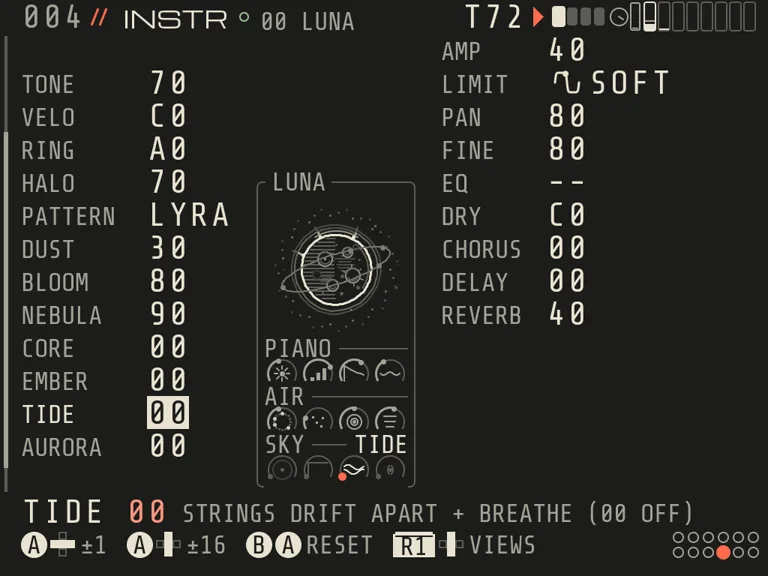
Four new dials on the LUNA piano: CORE, a deep soft octave below; EMBER, notes that glow on slowly; TIDE, strings that drift and breathe; AURORA, LUNA in stereo with a moving sky.
BALANCE learns your song
X on BALANCE: it listens to about half a minute of your mix and keeps what it learned with the song. Renders use it and start faster.
QUICK MIX with groups
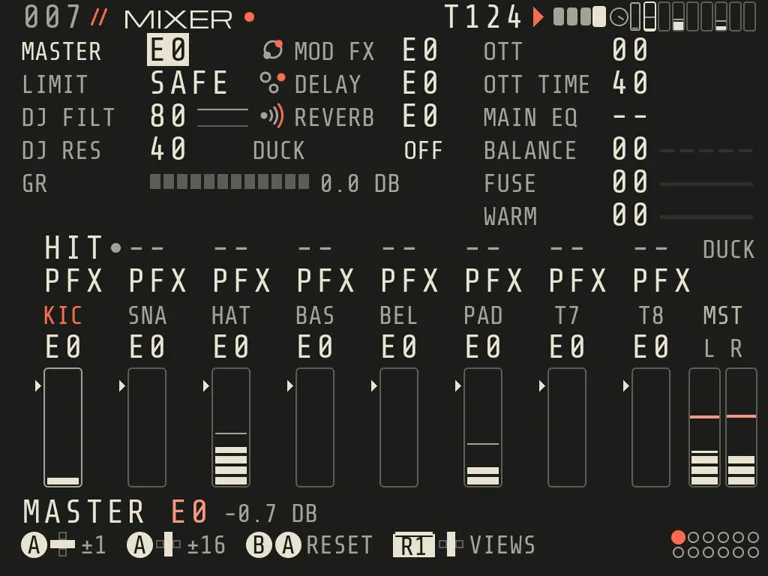
Group strips next to the eight tracks, mute on the bar, a DJ filter and A/B scenes. Volumes now read in dB.
A new hangar
The engine picker is redrawn: a big spotlight card and a 2×4 list. Each engine's picture moves when the cursor lands on it.
Record from your computer
With USB AUDIO set to IN, Y on the REC card switches the mic to USB IN: record what your computer plays straight into MORPH or SAMPLER, up to 30 s. Saved as Recordings/USB_nnn.wav, as it came.
06 · Learn OZMA inside OZMA
A new course: 25 lessons + 7 DEEPER
The course on the Brick is rebuilt for 0.9. Seven new lessons teach LOOPS, PICK + FILL, MAKE LOOP, EFFECTS, RECORD A SOUND, MORPH LOOP and YOUR TRACK, a finale where you make a break, a drop and one WAV. When you finish, DEEPER opens: an extra orbit of seven more.
How to start a lesson
1Press MENUThe small round button under the d-pad, on the left. From any screen, HELP opens right on LESSONS.
2Press AA on the big card starts the next lesson, or continues the one you began. The line at the bottom shows each step.
3Back to your songAny time: MENU, then X on LESSONS.
Basics 6the map, LIVE, the clip, sound, samples, loops
New lessons are in cream. The new course starts fresh; your songs stay.
07 · Fixed in 0.9
36 fixes, big and small
Before release, 0.9 went through two big rounds of testing. This is what they caught, in plain words.
36 / 36 fixed
Sound and playback8
Big jumps of a group's AMOUNT, of MOD FX and of most REVERB knobs no longer click.
Changing a group effect while it plays is a short crossfade, not a jump.
PLAY after STOP sounds like the first PLAY and like the export.
A quiet song loaded after a loud one starts at its own level.
SQUEEZE, GROWL, DRIVE and SMACK keep the first instant of a loud hit after a quiet part.
ECHO past 100 % dies away instead of growing into an endless drone.
SHIMMER turned up again no longer plays a moment of old reverb.
DUCK step styles no longer buzz at a fast RATE.
Samples and loops8
SAMPLER slices play the slice of the key you wrote, on any SCALE.
With JAM CHORD on, every key of a sliced SAMPLER plays its own slice.
A slowed drum loop rings out into the gaps instead of falling silent.
BEATS keeps the grid on long, busy loops (it lost it after the 128th hit).
Loud loops are no longer cut flat when they are stretched.
A kick or a stab with a tempo in its name stays a one-shot.
×2 and ÷2 on a LOOP clip's BPM now really play it at double or half speed.
A chopped SAMPLER keeps its cuts through SAVE, LOAD and CLONE, and REVERSE or TRIM move the cuts with the sound.
MORPH7
Keys above the top of a piano play again, an octave lower, so a melody up there stays in key.
A very high key with a layer B no longer jumps out louder than the key below it.
A note cut by KIL or by another note stays cut: its ring no longer comes back.
Turning WEIRD up on a sounding note brings the ring in at the level of a fresh note.
A saved, loaded or cloned MORPH keeps its region and its layer B file.
POOL CLEAN no longer deletes the file of a MORPH layer B.
RENDER, BOUNCE and COMMIT wait while a MORPH is still loading, instead of leaving it out.
Songs and saves6
A power cut right after SAVE no longer writes a duplicate version.
LOAD's NEWEST names the song you really saved last. This one came from a player's report.
POOL now reads saved ATLAS and KEPLER instruments, so CLEAN works with them.
A new modulator type in MODS starts from its own values (an ADSR turned into an LFO did nothing).
MENU on a finished REC take no longer loses it.
Sound comes back after the Brick sleeps and wakes.
Screens and words7
Help lines that were cut with “..” now fit, on EFFECTS, SAMPLER, MOTION and more.
One word for one thing: LOADING, LISTEN, A FILE, MOD FX.
Undo messages name what came back.
On MIXER, B+R1 mute and B+L1 solo act on the strip under the cursor.
MASTER and the effect returns step in dB, as they read.
Muted and solo-silenced track names stay readable on SONG and LIVE.
A dim INSTALL or ROLLBACK in UPDATE says why at once.
Your songs come with you. 0.9 opens 0.8.2 songs, and they keep their old effects. A song that uses MORPH opens only in 0.9: 0.8.2 says LOAD: UNSUPPORTED INSTRUMENT, leaves it closed and deletes nothing.
Get 0.9
Update over Wi‑Fi, or download
On 0.8.2: PROJECT › UPDATE. CHECK, DOWNLOAD, then hold A on INSTALL. OZMA saves your song, restarts and comes back on 0.9. Songs, samples and settings stay.
Or download 0.9 wherever you get OZMA. Now on Knulli OS too.
New to OZMA, or on 0.8? Get it on itch.io: free, pay what you want. Made by one person, shaped by players on Discord. How Wi‑Fi updates work
Free, like every release. Want more of them? Join the crew →
USB, two ports, two jobs. A MIDI keyboard or a groovebox goes into the top port: it gets OZMA's sound and its tempo. The bottom USB‑C goes to a computer, which sees a sound card and a MIDI port called OZMA, no driver needed.
Updates over Wi‑Fi. PROJECT › UPDATE: CHECK, DOWNLOAD, hold A on INSTALL. Signed and checked before a single file changes; songs, samples and settings are never touched; if a new version fails to start, the old one comes back by itself. Hold A on ROLLBACK to go back by hand.
19 lessons inside OZMA (now 25 + 7 in 0.9).
The hangar tells you what each engine is; undo while you jam (R1+L2, R1+R2); no more stray R1 jumps; a way back from CLIP LIST.
The real UPDATE page, filmed on 0.8.2.
USB setup, step by step
A MIDI keyboard top port
Plug the keyboard into the top port. OZMA finds it by itself.
Play. The keys play the track under the cursor (MIDI › IN TRACK AUTO, IN CHAN ANY).
One channel per track? Set IN TRACK to MULTI and give each track its channel.
A groovebox with USB audio top port
On OZMA: AUDIO › OUTPUT AUTO, MIDI › CLOCK OUT ON.
On the groovebox: turn on clock receive and transport receive, and route its USB audio input to a track.
One cable from the Brick's top port to the groovebox. OZMA's sound goes in, its tempo follows OZMA.
Play on OZMA starts it. STOP ALL on LIVE stops it on the bar, together with OZMA.
Plugged in or turned CLOCK OUT on mid-song? OZMA tells it where the song is, so it joins on the right step.
A computer bottom USB-C
AUDIO › USB AUDIO OUT. Quit OZMA and start it again.
Plug the bottom USB-C port into the computer. A sound card and a MIDI port called OZMA appear: no driver on Windows, macOS or Linux.
Pick OZMA as the input in your DAW and record.
To sync: CLOCK OUT ON and let the DAW follow OZMA's clock, or CLOCK IN AUTO and let the DAW lead.
Dropouts? Raise AUDIO › BUFFER. Brick quiet while you record? AUDIO › BRICK MUTED.
Good to know
Unplug and replug while playing works: the sound moves back to the Brick and returns when the device is back.
Most gear that works with a computer without a driver works here. Tested so far: Arturia MiniLab and Elektron Tonverk on the top port, a Windows PC on the bottom port. Tell us on Discord what else you plug in.
MIDI over Wi-Fi is still there: MIDI › NET MIDI ON.
0.8“First light” · the first open betaNov 2026
A standalone groovebox that runs on the TrimUI Brick itself: 8 tracks, STEP and LOOP tracks, a LIVE and SONG grid of clips.